
License plate recognition software for Windows
Connect your existing RTSP/ONVIF IP camera and test live plate reading and barrier triggering on your own Windows PC free for 7 days.
- Works with existing IP cameras
- 7 days free (up to 2 cameras)
- No credit card required
- Data stays on your local PC
7-Day Free Trial License & Windows Installer
Submit the 3-field form below to instantly generate your 7-day license key (up to 2 cameras, full offline features) and resumable Windows MSI installer. No credit card required.
Minimum System Requirements
- Operating System
- Windows 10 or Windows 11 (64-bit)
- CPU & Memory
- Quad-core Intel Core i5 / Ryzen 5, 8 GB RAM
- Camera Stream
- 1080p H.264 RTSP/ONVIF IP camera over wired PoE
- Internet
- Required once for trial activation; recognition runs offline
Resumable Direct MSI Package
AI recognition models are bundled inside the MSI; no post-install downloads or cloud connection needed for plate reading.
Install & Read Your First Plate in 4 Steps
Setup takes ~5 minutes on a standard Windows 10/11 PC.
- 01
1. Download the resumable .msi installer
Complete the form above to get your download link. Interrupted downloads can be resumed directly in your browser.
- 02
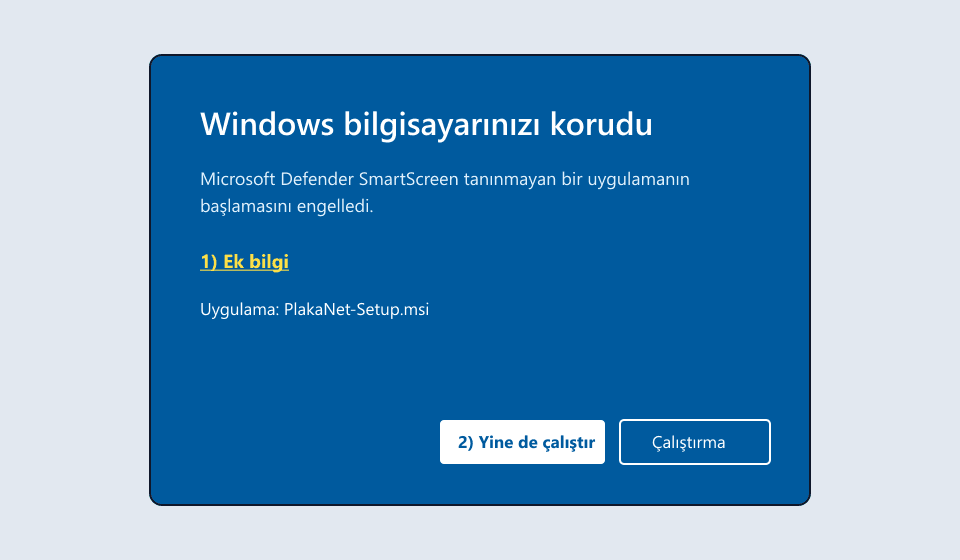
2. Click 'More info → Run anyway' on Windows SmartScreen
If Windows displays 'Windows protected your PC', click 'More info' and then 'Run anyway' to start the MSI setup wizard.
- 03
3. Activate your 7-day trial license key
Paste the generated license key into PlakaNet on first launch to unlock up to 2 cameras.
- 04
4. Connect your RTSP camera stream
Enter your camera's RTSP URL and verify live plate recognition right at your gate.
Passing the Windows SmartScreen Prompt
On Windows 10/11, direct MSI installers may show a SmartScreen prompt on first launch. Click 'More info' ('Ek bilgi') and then 'Run anyway' ('Yine de çalıştır').
Tested IP Camera Families & Required Stream Settings
Only camera families and protocols verified directly with PlakaNet for RTSP stability, night shutter clarity, and headlight suppression are listed below.
| Camera Family / Protocol | Verified RTSP Path | Resolution & FPS | Night Shutter Speed | Angle & Glare Rule |
|---|---|---|---|---|
| Hikvision DS-2CD2T / DS-2CD20 & HiLook IPC-B (2MP–4MP Bullet) | /Streaming/Channels/101 (H.264 Main) | 1920×1080 · 15–25 fps · Wired PoE | 1/500 s – 1/1000 s (Manual / Fixed) | HLC On, ≤ 25° horiz., ≤ 30° vert., plate ≥ 130 px |
| Dahua IPC-HFW2 / Lite & WizSense Series (2MP–4MP Bullet) | /cam/realmonitor?channel=1&subtype=0 | 1920×1080 · 15–25 fps · Wired PoE | 1/500 s – 1/2000 s (Shutter Priority) | HLC or balanced WDR, moderate Smart IR, ≤ 25° angle |
| ONVIF Profile S Standard PoE IP Cameras (H.264) | ONVIF RTSP H.264 primary stream | 1080p minimum · 15–25 fps · Wired PoE | ≥ 1/500 s at night (disable Auto 1/25 s) | Plate width ≥ 120–150 px, direct lane alignment |
Transparency note: Untested camera models are never listed here. You can validate any RTSP IP camera free for 7 days on your Windows PC or send a 15-second gate clip via WhatsApp.
Are your existing camera and gate suitable for PlakaNet?
Share a photo of your entrance and your IP camera or barrier model (RTSP/ONVIF cameras such as Hikvision, Dahua, Axis, HiLook, Uniview, etc.) on WhatsApp; we will review angle and image suitability free of charge before you buy hardware.
- Entrance angle and night-vision check
- RTSP/ONVIF camera & HTTP/TCP/relay barrier review
- Clarify software-only vs. turnkey setup